
Enterprise Mobile App Development Guide 2026
Complete enterprise mobile application development guide covering architecture, tech stack, costs, and development process to build scalable business apps.
 26 min read
 March 30, 2026


From Amazon warehouse workers scanning thousands of packages per shift to JPMorgan Chase relationship managers pulling up live client portfolios from anywhere in the world, enterprise mobile app development is changing how large organizations actually get work done.
But many organizations are not there yet.
Think about every workflow that still requires someone to walk back to a desk. Every paper form that gets filled out in the field and re-entered into a system hours later. Every approval sitting in an email inbox while someone waits. These are not edge cases. They are everyday bottlenecks that slow teams down and create unnecessary friction.
The Enterprise Mobility Management Market size was estimated at USD 22.80 billion in 2025 and expected to reach USD 24.87 billion in 2026, at a CAGR of 9.55% to reach USD 43.20 billion by 2032.as organizations across manufacturing, healthcare, retail, logistics, and financial services push to mobilize their operations. (Source: marketresearch.com)
Businesses across every sector are investing in enterprise mobile app development services because the ones that have already done it are moving faster, working with more accurate data, and delivering better employee and customer experiences. And the gap between them and everyone else is only getting wider.
In this guide, you’ll learn everything you need to know about enterprise mobile app development.
What Is Enterprise Mobile App Development?
Enterprise mobile app development is the process of designing, building, deploying, and managing mobile applications built for the operational realities of large organizations.
It is not the same as building a consumer app for a broad audience. Mobile app development for enterprise focuses on solving specific business problems for specific user roles inside a controlled organizational environment.
And it goes well beyond writing code for a mobile screen. It includes:
- The offline architecture that keeps field workers productive without internet access
- The backend infrastructure that syncs data across thousands of devices simultaneously
- The security and compliance layer that meets regulatory requirements
- The device management setup that gives IT control over every device in the fleet
- The integrations that connect mobile workers to data inside ERP, CRM, and HRMS platforms
Enterprise mobile app development is the full discipline of making mobile technology work reliably, securely, and at scale inside a large organization.
Why Enterprises Need Mobile Apps Today
The modern enterprise workforce is not sitting at a desk waiting for information to reach them through a portal. They are on factory floors, at job sites, in client meetings, in warehouses, on delivery routes, and in hospitals.
The organizations that give these workers mobile access to the data and workflows they need tend to outperform the ones that still make their people walk back to a desktop to do anything meaningful.
Beyond workforce enablement, there are five pressures pushing enterprise mobile app development up the priority list for most large organizations right now:
- Operational speed: Competitors who have mobilized their operations respond faster, resolve issues faster, and close deals faster. That advantage builds over time.
- Data quality: Manual data entry and paper-based processes produce errors, delays, and gaps. Structured mobile data capture removes all three at once.
- Customer expectations: Business customers today expect real-time visibility, fast communication, and self-service access.
- Workforce distribution: Hybrid work, global teams, and field-based operations have made the centralized, desktop-first workforce outdated for most large organizations.
- Compliance requirements: Regulators increasingly require digital audit trails and access controls that paper-based processes cannot produce.
Key Differences from Regular Mobile Apps
The difference between a regular mobile app and an enterprise mobile app is not cosmetic. It runs deep through the architecture, the operational requirements, and the organizational complexity involved.
A regular mobile app is built for a general audience, assumes consistent connectivity, needs minimal integration, requires basic security, and gets downloaded from a public app store. Mobile app development for enterprise produces something fundamentally different.
| Factor | Consumer App | Enterprise mobile app |
| Users | General public | Defined workforce, managed devices |
| Connectivity | Always assumes online | Offline-first with reliable sync |
| Security | Basic login credentials | SSO, MDM, RBAC, certificates |
| Integrations | Minimal | GERP, CRM, HRMS, WMS, legacy |
| Compliance | Usually none required | HIPAA, GDPR, SOC 2, ISO 27001 |
| Distribution | Public app store | MDM push or enterprise store |
| Dev timeline | 1 to 4 months | 6 to 20+ months |
| Cost | $5,000 to $40,000 | $40,000 to $500,000+ |
Now that we understand what enterprise mobile app development is and why it matters, the next important question is: what exactly makes an app qualify as enterprise-grade?
What Makes an App “Enterprise”?
Not every mobile app built for a business qualifies as an enterprise mobile app. The word enterprise describes a specific technical and operational standard that separates purpose-built organizational tools from general-purpose software.
- Defined user base with role-based access: Enterprise apps serve a known set of users organized by role. A warehouse picker, a logistics manager, and a CFO have different data needs and different permission levels. A real enterprise mobile app enforces this at the architecture level.
- Deep integration with existing systems: Enterprise apps connect to SAP, Oracle, Salesforce, Workday, Microsoft Dynamics, and the legacy databases that predate all of them.
- Offline-first reliability: Field workers cannot wait for a signal. Enterprise mobile apps store data locally, capture new records offline, and sync cleanly when connectivity returns.
- Managed distribution and device control: Enterprise apps are distributed through MDM platforms like Microsoft Intune, Jamf, or VMware Workspace ONE, not through public app stores.Compliance and audit capability: In regulated industries, enterprise mobile apps need documented, timestamped records of every action. This must be built into the foundation.
Understanding what makes an app enterprise-grade naturally leads to the next question: what types of enterprise mobile apps actually exist, and which one does your organization need?
Types of Enterprise Mobile Apps
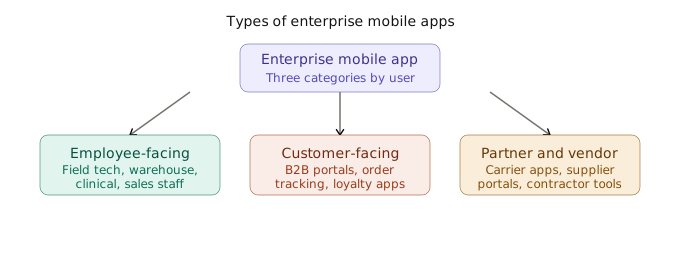
Employee-Facing Apps
The most common output of enterprise mobile app development. Built for the internal workforce: field technicians, warehouse workers, sales reps, clinical staff, and delivery drivers. These apps need deep ERP integration, solid offline functionality, and an interface simple enough to use in 30 seconds under real working conditions.
Example: A field service technician receiving work orders, photographing equipment, logging repair notes, and collecting customer signatures, with everything syncing to the back-office system automatically without a phone call back to the office.
Customer-Facing Apps
These bring the organization’s services directly to its customers. The enterprise distinction here is integration depth. A customer-facing enterprise app does not just display information. It connects to real inventory levels, live order status, account history, and service records.
Example: A loyalty program mobile app where users can browse products, track rewards, view offers, and manage their transactions, while also staying connected with the brand through a centralized admin system that controls catalogs, points, and engagement activity.
👉 See how we turned this example into reality with our loyalty program app
Partner and Vendor Apps
These extend enterprise mobile access to external partners, suppliers, and contractors. They require careful permission design because external users need enough access to do their job without seeing data that belongs to other partners or the organization’s internal operations.
Example: A carrier network mobile app where drivers receive pickup assignments, confirm collections with a barcode scan, and upload proof of delivery photos that flow directly into the logistics company’s TMS.
Now that you know the types of enterprise mobile apps available, it is worth asking whether your organization actually needs one right now.
When Does a Business Need an Enterprise App?
Enterprise mobile app development becomes necessary when existing tools can no longer keep up with how the business actually operates. The warning signs are usually visible well before the pain becomes severe.
| Warning Sign | What It Means |
|---|---|
| Field teams disconnected from systems | Workers improvise, write things down, and enter them later. Data does not reflect reality. |
| Paper-based critical workflows | Quality inspections, delivery confirmations, and patient records on paper carry data quality risk. |
| Data silos slowing decisions | Sales, ops, finance, and field teams work from different versions of the same data. |
| Compliance outgrowing current systems | Regulators require digital, auditable records that paper and consumer apps cannot produce. |
| Competitors responding faster | Mobile capability is usually the reason competitors resolve issues and close deals faster. |
| Unmanaged device fleet | Employees using personal devices with no MDM oversight create a growing security risk. |
| Slow onboarding for field workers | Weeks of training on systems difficult to use on mobile means lost productivity per head. |
If several of these warning signs apply to your organization, the sections below will show you exactly what enterprise mobile app development looks like in your industry.
Enterprise Mobile App Development Use Cases by Industry
Mobile app development for enterprise is producing measurable results across every major industry. Furthermore, the use cases below demonstrate what is possible when enterprise mobile app development services are approached with the right strategy.
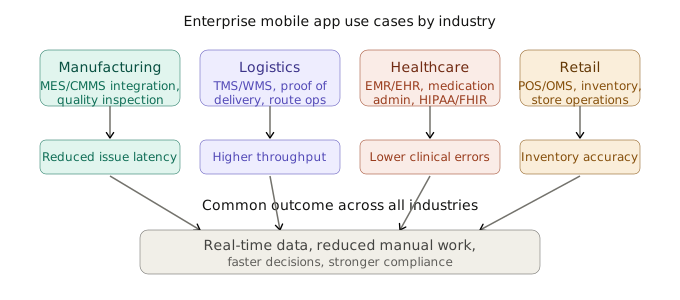
Manufacturing Mobile apps integrate with MES and CMMS to capture inspection data, trigger non-conformance workflows, and manage maintenance tasks. Real-time dashboards expose production KPIs, downtime, and quality metrics directly on the factory floor. As a result, organizations report reduced latency in issue detection and significantly higher data integrity.
Logistics and Transportation Field apps integrate with TMS and WMS systems for route optimization, proof of delivery with e-signatures and images, and real-time exception handling. Warehouse apps use barcode and RFID scanning for inventory workflows. Companies like FedEx and DHL operate at scale with such systems, achieving improved throughput, traceability, and operational accuracy.
Healthcare Mobile apps connect with EMR and EHR systems for medication administration with barcode validation, bedside documentation, and offline-first data capture for home care. Built with strict HIPAA and FHIR compliance, these systems consistently deliver lower clinical error rates and real-time records across care settings.
Retail Mobile apps integrate with POS, OMS, and inventory systems for real-time stock lookup, pricing, and order management. Backend workflows include replenishment, stock audits, and loss prevention tracking. Consequently, retailers report optimized store operations and synchronized inventory visibility across all locations.
These industry outcomes demonstrate the real business value of enterprise mobile app development. However, before investing, it helps to understand exactly what benefits your organization can expect.
Key Benefits of Enterprise Mobile App Development Services
The business case for enterprise mobile app development services sits on measurable outcomes, not theoretical improvements. Here is what organizations actually experience after a well-executed program.
- Productivity improvement Organizations consistently report productivity gains of 20 to 40% in field operations after deployment. Tasks that took hours now take minutes. Approvals that sat in email queues for days get handled in seconds.
- Real-time data access A logistics manager who can see driver locations, delivery statuses, and exceptions live makes better decisions faster than one waiting for an end-of-day summary. Real-time data access is, therefore, what makes the operational speed advantage work in practice.
- Process automation Manual workflows get replaced with consistent, error-free execution. A work order that routes automatically to the nearest available technician. An invoice that generates when a delivery is confirmed. A quality review triggered the moment an inspection fails.
- Better decision-making When managers and executives have mobile access to dashboards and alerts, the time between something happening and the right person acting on it shrinks dramatically.
- Enhanced customer experience Field teams with instant mobile access to customer history and service records deliver better service. First-time fix rates rise. Customers get real-time updates instead of promised callbacks.
- Cost reduction The expenses that disappear after a well-run program, including manual data re-entry labor, errors caught after the fact, and paper process administration, consistently add up to more than the development investment within the first two years.
- Stronger compliance and security Every user action is logged with a timestamp, user identity, device identifier, and location. Access is controlled by role at the application level and by policy at the device level.
Scalability without proportional cost growth Adding 500 new users to a properly architected mobile platform does not require 500 new licenses, 500 new desktops, or a proportional IT headcount increase.
To deliver these benefits consistently, however, enterprise mobile apps must include specific technical features that consumer apps simply do not have.
Core Features of Enterprise Mobile Apps
The features below are what separate enterprise mobile apps from consumer apps. Moreover, each one contributes directly to the business outcomes described in the previous section.
| Feature | Why It Cannot Be Optional |
|---|---|
| Security and compliance | Multi-layer protection: biometrics, RBAC, encryption, full audit trail |
| Scalability | Must perform at 10,000 users as well as at 100 |
| Enterprise system integrations | SAP, Oracle, Salesforce, Workday connected with real-time sync |
| Offline functionality | Field workers cannot stop for connectivity |
| Role-based UX | Interfaces tailored to each role’s specific workflow |
| Analytics and reporting | Performance metrics on any device, at any time |
| Cross-platform support | Consistent functionality across all fleet hardware |
| Push notifications | Critical alerts reach users instantly |
| Biometric authentication | Fast, secure access for field workers |
| Remote wipe and lock | Lost devices cleared immediately by IT |
Security in enterprise mobile app development is not a feature added at the end of the project. It is the foundation on which everything else is built.
Offline functionality deserves particular attention because it is the most important technical differentiator between enterprise and consumer mobile apps. Enterprise mobile apps need to store relevant data locally on the device, capture new records when offline, queue backend operations, and sync everything accurately when connectivity returns. Getting this wrong in production means data loss. Getting it right is what makes field workers actually trust the system.
Once you understand the features required, the next step is understanding the architecture that supports them.
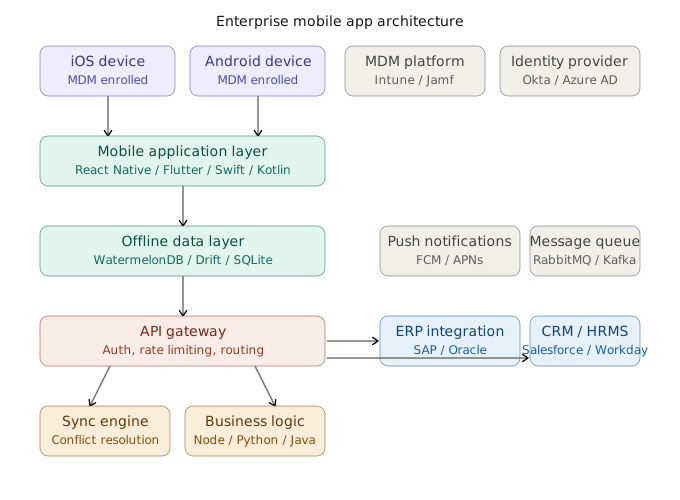
Monolithic vs. Microservices vs. Modular Monolith
One of the first decisions in enterprise mobile app development is choosing the right backend architecture. Each approach has specific trade-offs that directly affect your development timeline, cost, and scalability.
| Architecture | Best For | Watch Out For |
|---|---|---|
| Monolith | Clear scope, one team, under 14 months, defined budget | Harder to scale individual components later |
| Modular monolith | Most enterprise projects, clean module boundaries, phased plans | Requires discipline to maintain module separation |
| Microservices | Separate teams owning separate domains, genuinely different scaling needs | Infrastructure overhead, deployment complexity, cost |
For most enterprise mobile app development programs, a well-organized modular monolith with clean internal boundaries is the right starting point. Teams that build microservices before they need them spend more time managing infrastructure than building the product their users are waiting for.
API-First Architecture
API-first means designing the contracts between the mobile layer and the backend before either side begins development. Once the API shape is agreed upon, both teams can build in parallel against the same documented contract. This, in turn, avoids the multi-week integration scramble at the end of a project that happens when teams build independently.
Backend for Frontend (BFF)
The BFF pattern creates a dedicated API layer optimized specifically for the mobile client. It returns only what the app needs, aggregates data from multiple backend services into a single response to reduce network round trips, and handles translation between backend data formats and what the mobile client consumes. This directly results in faster screen loads, lower data usage, and better performance under degraded network conditions.
The Enterprise Mobile App Development Process: Step by Step
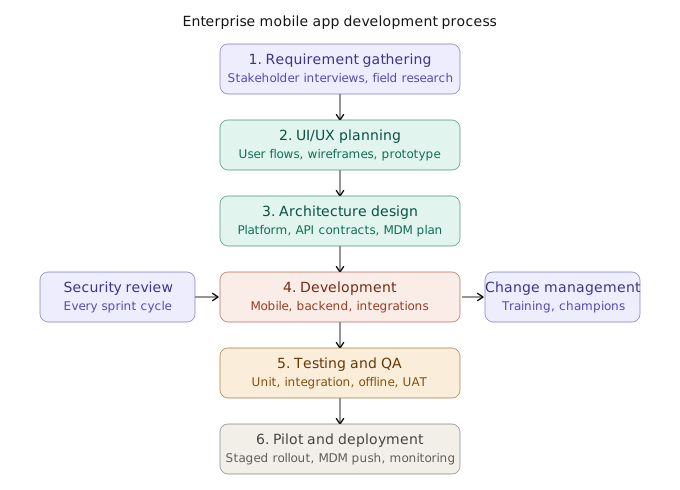
Step 1: Requirement Gathering
This is the phase that determines everything downstream. Before any design or development work begins, the team conducts stakeholder interviews, observes users in their actual environments, audits existing systems, maps integration requirements, documents compliance obligations, and agrees on the specific outcomes that will define success.
Organizations that invest properly in this phase typically spend 8 to 12% of the total program budget here. Those that skip it, however, spend two to three times that amount correcting decisions that field research would have caught early.
Step 2: UI/UX Planning
Good enterprise mobile UX starts with real research, not assumptions made in a conference room. This means spending time with actual users in their actual environments, mapping user flows by role, producing wireframes that representative end users review, and building an interactive prototype that stakeholders test before a single line of production code is written.
Changing a wireframe costs hours. Changing a post-launch UX element, on the other hand, costs weeks of engineering, testing, and redeployment across a managed device fleet.
Step 3: Architecture Design
With requirements locked, the team designs the full technical blueprint across platform selection, API contracts, offline strategy, MDM plan, and integration approach. Decisions made here determine offline reliability, security posture, and operational cost for years. Consequently, changing architecture after development has started is expensive, and changing it after launch is more expensive still.
Step 4: Development
Native development builds separate applications for iOS and Android and is the right choice when deep hardware integration is a genuine requirement.
Cross-platform development using React Native or Flutter, on the other hand, builds a single codebase for both platforms. Around 80 to 90% of the code is shared. For most enterprise programs, cross-platform is the sensible default because it costs less to build, less to maintain, and lets a single team support both platforms without doubling the engineering effort.
Step 5: Testing and Quality Assurance
| Test Type | What It Verifies |
|---|---|
| Unit testing | Individual components work correctly in isolation |
| Integration testing | Backend connections and sync handle failure conditions properly |
| Offline and sync testing | Data captured offline syncs accurately with no loss under any scenario |
| Device and OS compatibility | Performance across actual hardware and OS versions in the fleet |
| Network degradation testing | App behavior under 2G, intermittent signal, and full offline |
| Security and penetration testing | Encryption, access control, session management, MDM enforcement |
| Performance testing | Backend holds under peak load from the full device fleet |
| User acceptance testing | Real end users in real conditions confirm the app handles their workflows |
| Accessibility testing | WCAG 2.1 AA compliance, outdoor readability, gloved-hand usability |
User acceptance testing must happen with actual users in their actual environment. A warehouse picker testing a picking app tests it in the warehouse. Testing at a desk, by contrast, does not find the problems that cause adoption failures after launch.
Step 6: Pilot and Deployment
Before going live, the team needs MDM enrollment configured and tested across all device models, the app distributed through the enterprise store or MDM push rather than a public store, all OS versions tested against production, data migration rehearsed and validated, and monitoring active before the first user connects.
Running a pilot with 20 to 50 users across roles and locations for two to three weeks before full deployment is standard practice. The issues that surface in a pilot are almost always issues that no controlled test environment would have caught.
A successful development process, however, still depends on getting security and compliance right from day one.
Security and Compliance in Enterprise Mobile App Development
Security and compliance are not features that can be added to a finished application. They are the foundation. Getting this wrong does not just create technical debt. It creates regulatory exposure, data breach risk, and problems that are expensive and slow to fix after a system is already in production.
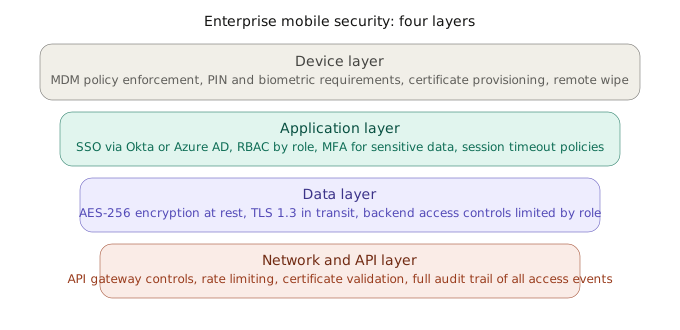
Data at rest on the device needs AES-256 encryption so a lost or stolen phone does not expose sensitive information. Data moving between the device and the backend needs TLS 1.3 with properly validated certificates. Data in backend databases, furthermore, needs access controls limiting exposure to only the services and users that actually need it.
Compliance Framework Requirements
| Standard | Who Needs It | Key Requirements |
|---|---|---|
| HIPAA | Healthcare organizations | Access controls, audit logs, breach notification, risk assessments |
| GDPR | Any org handling EU personal data | Data minimization, consent management, right to deletion, data residency |
| SOC 2 | SaaS and enterprise tech | Security policies, access management, availability monitoring, incident response |
| ISO 27001 | Broad enterprise use | Information security management, risk treatment, continuous improvement |
| PCI DSS | Payment data handlers | Card data encryption, access restriction, regular security testing |
These are not checkboxes. They are operational requirements that need to inform architecture decisions from the first planning session, not the week before launch.
Even with strong security in place, organizations still face a range of challenges during enterprise mobile app development that are worth planning for in advance.
Common Challenges in Enterprise Mobile App Development
The challenges that derail enterprise mobile app development programs are largely predictable. Which means they are, therefore, largely avoidable if you plan for them.
- Data security risks: Sensitive organizational data, devices moving through uncontrolled environments, and complex integrations create a layered security risk. Organizations that build security into the architecture from day one spend far less on remediation than those that treat it as a pre-launch review step.
- Integration complexity: Connecting enterprise mobile apps to existing systems is consistently the most underestimated technical challenge. Legacy ERP systems with batch-only update cycles, CRM platforms with outdated authentication models, and custom databases with no documentation all add complexity and timeline risk that cannot be predicted from documentation alone.
- High development cost: Total cost is frequently underestimated by organizations that focus only on the development line item without accounting for the full program: discovery, architecture, integration work, security implementation, MDM configuration, testing, training, deployment coordination, and ongoing maintenance.
- User adoption: Low adoption is one of the most common outcomes of enterprise mobile app development programs that prioritize technical delivery over the experience of the people actually using the product. Adoption begins in the requirements phase and needs to be supported through to post-launch training in the actual working environment.
- Change resistance: Workers comfortable with existing processes resist change not because they are irrational, but because change creates uncertainty and a temporary dip in performance. A deliberate change management plan addresses this before it becomes an adoption problem.
Knowing these challenges in advance means you can directly address them through a clear set of best practices.
Best Practices for Enterprise Mobile App Development
The organizations that consistently deliver successful enterprise mobile app development programs tend to follow the same set of practices.
| Practice | Why It Matters |
|---|---|
| Mobile-first strategy before mobile-first code | Builds the right system first instead of the wrong one efficiently |
| Authentication built in from day one | Security retrofitted later costs far more and leaves gaps |
| Test on actual fleet devices | Latest hardware performance does not reflect older fleet reality |
| QA embedded in every sprint | Continuous testing prevents the end-of-project integration disaster |
| Maintenance plan defined before launch | Post-launch drift in reliability and security is preventable |
| Pilot before full deployment | Pilot issues cost a fraction of post-launch issues |
| Change management as a program workstream | Technical excellence without adoption delivers zero business value |
Define the mobility strategy before defining the application. Which workflows move to mobile, for which roles, in what priority order? Organizations that answer these questions clearly before engaging enterprise mobile app development companies build the right thing first. The ones that jump straight to building an app often build something technically solid that solves the wrong problem.
Understanding best practices leads directly into the practical question every organization asks next: how much does enterprise mobile app development actually cost?
Cost of Enterprise Mobile App Development
The cost of enterprise mobile app development ranges from $40,000 to $500,000+, depending on the complexity of the offline architecture, the number of enterprise system integrations, the device fleet scope, compliance requirements, and the capability and location of the development team.
What drives cost higher: complex offline sync with conflict resolution logic, legacy system integrations with limited API documentation, compliance requirements like HIPAA, SOC 2, or GDPR, AI and machine learning features, real-time data processing at scale, building for both iOS and Android simultaneously, and wide device and OS version support.
What brings cost down: thoroughly documented requirements before development starts, a phased delivery approach that builds core workflows first, reusing existing backend services and authentication infrastructure where possible, a dedicated product owner who can make decisions quickly, and keeping the device scope narrow in phase one.
| Solution Type | Scope | Cost Range | Timeline |
|---|---|---|---|
| Small enterprise app | Core workflow, 1 to 2 integrations, basic offline, standard authentication | $40,000 to $100,000 | 6 to 9 months |
| Medium enterprise app | Multi-role workflows, 3 to 5 integrations, offline-first sync, custom dashboards, MDM | $100,000 to $220,000 | 9 to 14 months |
| Large enterprise app | Full mobility program, AI features, 6+ integrations, compliance, large fleet management | $220,000 to $500,000+ | 14 to 20+ months |
With a clear understanding of costs, the next logical question is how to find the right enterprise mobile app development company to deliver the project.
How to Choose the Right Enterprise Mobile App Development Company
The development partner you choose shapes the quality of the architecture, the reliability of the integrations, the security of the system, and whether the launch goes smoothly. This decision matters as much as any technical decision that follows it.
What to look for in enterprise mobile app development companies:
Look for documented enterprise experience at real organizational scale. Consumer app portfolios do not qualify. Ask for case studies that explain the problems that were solved, not just screenshots of screens that were built.
The partner needs hands-on integration experience with the specific platforms your organization uses, not general API experience. For regulated industries, they must understand your specific compliance framework before the project starts. A partner learning about HIPAA during development will, consequently, hand over a system that needs significant rework before satisfying a regulator.
Ask directly how they approach offline-first design. A clear, specific answer covering conflict resolution strategy, local database selection, and sync architecture signals genuine experience. A vague reference to “offline support,” on the other hand, signals the opposite.
They must also have a documented post-launch support model. Programs that effectively end at launch leave organizations without the support they will need within the first few months.
Questions to ask enterprise mobile app development companies directly:
- Walk me through how you designed the offline sync architecture in a previous enterprise project. What conflict resolution strategy did you use and why?
- How do you handle integrations with legacy ERP systems that have limited or outdated API documentation?
- How is security review handled within your development process? Is it embedded in every sprint or a separate pre-launch activity?
- What does your post-launch maintenance model look like, and what are your response time commitments for security vulnerabilities?
- Can you share a reference from a client in a regulated industry where compliance was a core requirement of the project?
Even after selecting the right partner, however, there are specific mistakes that organizations consistently make during enterprise mobile app development that are worth knowing in advance.
Common Mistakes to Avoid in Enterprise Mobile App Development
- Overbuilding features in phase one: A first release with 40 features that overwhelm users delivers less value than a focused release with eight features that become part of daily workflow within the first month. Build core workflows first. Add based on measured adoption and real user feedback.
- Leaving scalability for later: Architecture decisions that work for 50 pilot users and break under 500 cannot be fixed with a patch. The backend infrastructure, database design, and API layer all need to account for the full user base from the start.
- Designing for the wrong user: Enterprise mobile users are standing, moving, sometimes in direct sunlight, and need to complete a task in under 30 seconds. Designing an enterprise mobile app for someone sitting at a desk with good lighting and unlimited time means designing it for the wrong person.
- Treating security as a pre-launch checklist: Security built into the architecture from the start costs a fraction of security retrofitted into a finished product. Programs that push security review to a pre-launch phase regularly find vulnerabilities that require months of rework.
- Skipping the pilot phase: Issues that surface in a 30-user pilot are almost always issues that no test environment would have found. Deploying directly to the full workforce without a structured pilot rarely works out.
- Ignoring change management: Technical excellence without a plan for adoption delivers zero business value. Change management needs a dedicated budget and owner from day one.
- Underestimating integration complexity: Auditing every integration point during requirements gathering and budgeting for integration work as a separate line item is how organizations avoid the most common source of timeline overruns and budget pressure.
Avoiding these mistakes positions your enterprise mobile app development program to succeed not just today but well into the future. Speaking of the future, there are several trends that will shape the next generation of enterprise mobility.
Future Trends in Enterprise Mobile App Development
AI integration is moving from back-office analytics into the devices workers carry every day. Predictive maintenance alerts, inventory replenishment suggestions, and natural language interfaces for business data are already in production at leading organizations. The ones building AI capability into their mobile architecture now are setting up a compounding advantage.
IoT-connected mobile apps are replacing dedicated control rooms. A single device surfacing alerts from hundreds of connected sensors, letting the operator drill into the data and trigger a workflow response, gives organizations field-level intelligence that was not practically accessible before.
Zero trust security architecture is becoming the standard for enterprise mobile programs. Organizations adopting it reduce their exposure to the credential-based attacks behind most enterprise data breaches today.
Augmented reality for field operations AR is moving from pilot programs into production in manufacturing, field service, and warehousing. A technician pointing a device at equipment and seeing repair instructions overlaid on the physical components, or a warehouse picker guided through a complex pick with AR navigation, is already running at enterprise scale at leading organizations.
Low-code mobile development Platforms like Microsoft Power Apps, OutSystems, and Mendix are enabling faster deployment for standard workflow automation use cases, allowing business teams to iterate without depending on a central IT queue. The most effective programs use low-code for appropriate use cases and custom enterprise mobile app development services for complex, integration-heavy workflows that low-code platforms cannot handle reliably.
How Smart WebTech Can Help with Your Enterprise Mobile App Development
Enterprise mobile app development is one of the most complex technology investments a large organization can make. The decisions made during strategy and architecture have consequences that play out across the field, in IT, and in the boardroom for years. Getting those decisions right requires a partner with genuine enterprise experience, not a consumer app portfolio with enterprise pricing on top.
Smart WebTech provides enterprise mobile app development services built around how your business actually operates. Not how a process diagram says it should operate. How your people actually do their jobs, in the actual environments where they do them.
We starts every enterprise mobile app development engagement with the people who will use the system, in the environments where they will use it. Everything else is built from that foundation.
If your organization is ready to mobilize its workforce, connect field operations to enterprise systems, and build something that grows with the business, Smart WebTech is ready to build it properly.
Connect with Smart WebTech to discuss your enterprise mobile app development project.
At Smart WebTech, we build enterprise mobile apps that match how your teams actually work on the ground, not just how it looks on paper. From field operations to system integrations, everything is designed to make day-to-day work simpler and more efficient.
If your organization is ready to mobilize its workforce, connect field operations to enterprise systems, and build something that grows with the business, Smart WebTech is ready to build it properly.
Connect Us to discuss your enterprise mobile app development project.