eCommerce Tech Stack: Choose the Right One in 2026
Learn how to choose the right eCommerce tech stack in 2026. Compare platforms, tools, costs, and integrations to build a scalable online store.
 17 min read
 June 9, 2026


Every successful online store runs on decisions most customers never see, and at the center of all of them is your e-commerce tech stack. Whether you are launching your first store or scaling past $5 million in revenue, the tools you choose and how they work together determine how fast you grow, how much you spend, and how much control you keep.
This guide walks you through everything: what an eCommerce tech stack actually is, the seven layers every modern stack needs, how to choose the right platform, what it all really costs, and how to build a stack that grows with you.
What Is an eCommerce Tech Stack?
An eCommerce tech stack is the complete set of software, platforms, and tools that power your online store from end to end. To understand it properly, think of it in two halves:
- Frontend: what your customers see and interact with.
Everything is visible on your store: the homepage, product pages, search bar, cart, and checkout. Your frontend determines how fast your store loads, how easy it is to navigate, and how much trust a shopper feels before they buy. - Backend: what runs everything behind the scenes
Your inventory system, order management, payment processing, CRM, shipping logic, and analytics. Customers never see the backend directly, but they feel it in every interaction: whether their order is processed correctly, whether their tracking updates on time, and whether the product they want is in stock.
Both halves need to work well individually, and more importantly, they need to talk to each other in real time. That is why your tech stack is not just a list of tools. It is the architecture that ties both sides together.
A well-connected e-commerce tech stack means the following:
- Your OMS knows the moment a customer checks out
- Your CRM automatically tags customers based on what they bought
- Your analytics dashboard reflects what is happening across every layer in real time
When that connection breaks down, you end up with data silos, manual workarounds, and a team spending more time managing tools than serving customers. The stack you build today will either accelerate your growth or quietly limit it.
Why Your eCommerce Tech Stack Directly Impacts Revenue
Your tech stack is not a back-office concern. It sits at the heart of almost every revenue-generating decision your business makes.
- Page speed: Every one-second delay in load time reduces conversions by around 7%. That is lost revenue every single day from a slow storefront decision.
- Inventory sync: When stock levels are not updating in real time, you oversell products you do not have. That leads to cancelled orders, refunds, and customers who rarely come back.
- Post-purchase experience: Most businesses invest heavily in getting customers to checkout but underinvest in what happens after. Delayed tracking, manual support queries, and slow returns all reduce repeat purchase rates directly.
- Analytics: Without a unified data view, your marketing team makes spending decisions on incomplete information, and campaigns that look profitable in one platform may be cannibalizing each other across channels.
Fix these four areas and your stack becomes a genuine growth engine, not just an operational necessity.
The 7 Layers of a Modern eCommerce Tech Stack
A well-built eCommerce technology stack is organized into layers, each handling a specific part of your business.
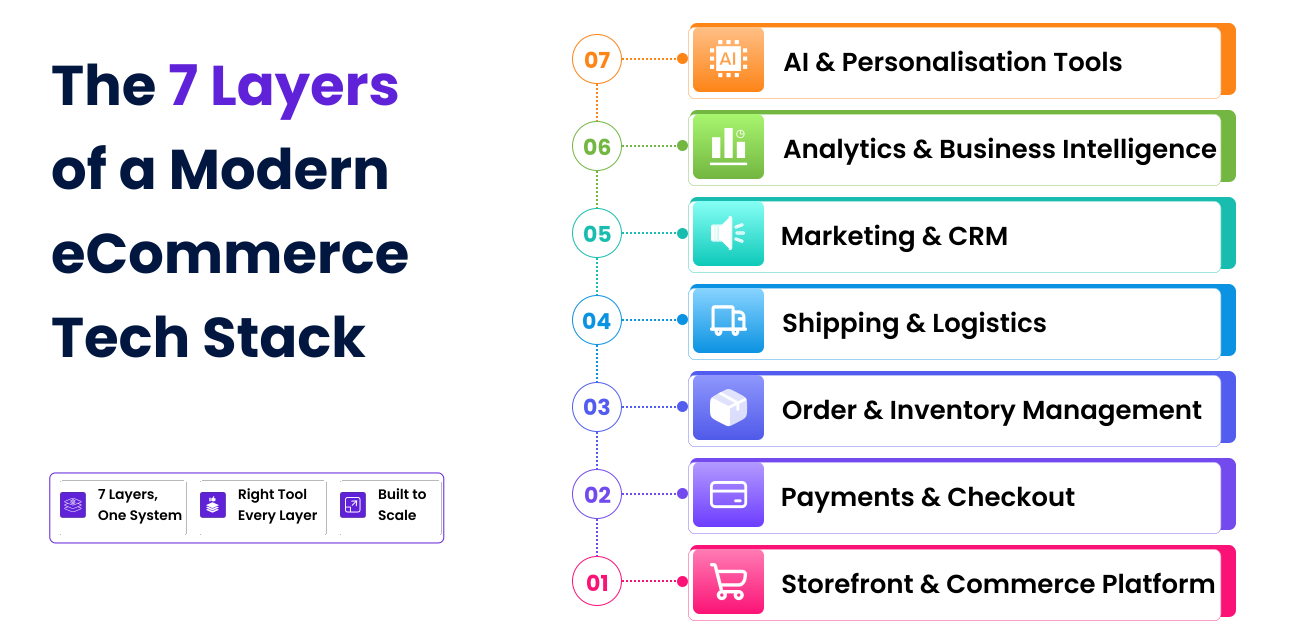
Layer 1: Storefront and Commerce Platform
This is the engine of your store. Your commerce platform powers everything customers interact with, product pages, search, cart, and checkout, and it is the layer that everything else connects to.
Choosing the right platform here is your single biggest technology decision, which is why we have dedicated an entire section to it below.
Popular choices: Shopify, WooCommerce, Magento, BigCommerce, Laravel
Layer 2: Payments and Checkout
Once a customer decides to buy, your payment layer needs to make completing that purchase as frictionless as possible. A strong payments layer handles:
- Multiple payment methods including credit cards, digital wallets, and BNPL.
- Fraud detection and chargeback management.
- PCI DSS compliance without adding unnecessary steps to the checkout flow.
Tools: Stripe, Braintree, PayPal, Square, Authorize.net
Checkout friction remains the single biggest driver of cart abandonment, so this layer deserves more attention than most businesses give it.
Layer 3: Order and Inventory Management
After checkout, your order management system (OMS) takes over. It tracks every order from placement to delivery, syncs stock levels across all your sales channels in real time, and alerts you when inventory runs low.
Without a reliable OMS, fast-growing stores run into the following:
- Overselling products that are out of stock
- Fulfilment delays that damage customer trust
- Inventory discrepancies across multiple channels
Early Stage: Zoho Inventory, inFlow, Growth stage: Linnworks, Skubana (Extensiv), ShipBob; Enterprise: NetSuite, Odoo Inventory
Layer 4: Shipping and Logistics
Shipping is where your brand promise either gets kept or broken. Your shipping layer should automatically generate labels, sync with your OMS on dispatch, send tracking notifications to customers, and trigger post-purchase CRM sequences without manual input.
Shipping tools: ShipStation, EasyPost, Shippo; Tracking: AfterShip, Narvar; Returns: Loop Returns, Happy Returns
Layer 5: Marketing and CRM
Your marketing and CRM layer is where customer data becomes revenue. Every purchase, page visit, and email open feeds into this layer, and when built well, it powers personalized campaigns that feel helpful rather than intrusive.
This layer connects directly to your storefront for behavioral triggers, your OMS for purchase history, and your post-purchase tools for retention campaigns.
Tools: Klaviyo, Omnisend, Drip, HubSpot, Attentive (SMS), Postscript (SMS)
Without this integration, your marketing team is essentially broadcasting to everyone the same way and leaving significant revenue on the table.
Layer 6: Analytics and Business Intelligence
Every layer of your eCommerce tech stack generates data. Your analytics layer turns that data into decisions. A good setup gives you a unified view of which campaigns drive the highest LTV customers, where shoppers drop off in your funnel, which products are quietly draining margin, and how fulfillment speed affects repeat purchases.
Tools: GA4 (starter), Triple Whale, Glew.io, Mixpanel (growth), Looker (enterprise)
This is the layer most early-stage businesses underinvest in and almost universally regret later.
Layer 7: AI and Personalisation Tools
In 2026, AI personalization accounts for 25 to 40% of revenue for leading eCommerce brands. This layer sits on top of your entire stack and relies on clean, connected data flowing from every other layer to function properly.
- Personalisation: Nosto, Dynamic Yield, Bloomreach
- Intelligent search: Klevu, Constructor.io, Searchspring
- Conversational commerce: AI chatbots integrated with your CRM and storefront
A personalization engine fed by siloed data produces recommendations that miss the mark. The same engine fed by a well-integrated stack surfaces the right product, to the right customer, at exactly the right moment.
What to Look for When Choosing eCommerce Tech Stack Tools
Before diving into specific platforms and tools, it is worth stepping back and establishing the criteria you should apply when evaluating anything you add to your stack. The right tool is not always the most popular one, it is the one that fits your business now and leaves room to grow.
Integration Compatibility
Every new tool you add should connect cleanly with what you already have. A powerful standalone tool that creates a data silo does more harm than good. Before committing, ask:
- Does it offer native integrations with your existing platform?
- Does it have an open API for custom connections?
- Is it compatible with middleware tools like Zapier, Make, or n8n?
Pricing Model and True Cost
Look beyond the headline subscription price. Many tools charge per seat, per order, or per revenue milestone, and those costs scale in ways that are not always obvious upfront. Evaluate:
- Is pricing seat-based, usage-based, or flat?
- Are key features locked behind higher-tier plans?
- What is the realistic monthly cost at your current volume and at 3x your current volume?
Must-Have vs Nice-to-Have
Not every tool needs to be in your stack from day one. Before adding anything, classify it honestly:
| Category | Definition | Action |
|---|---|---|
| Must-have | Without this, a core business function breaks | Add immediately |
| High value | Meaningfully improves an existing function | Add when budget allows |
| Nice-to-have | Adds convenience but not critical | Defer until growth stage |
Scalability
A tool that works well at ₹2 crore in revenue might buckle at ₹20 crore. When evaluating any tool, check whether it has customers at your next stage of growth, not just your current one. Look for flexible licensing, role-based access, and a product roadmap that is aligned with where eCommerce is heading.
Vendor Support Quality
Your tech stack is only as reliable as the support behind it. When something breaks, and eventually something always does, you need answers fast. Before committing to any tool, check:
- Is support available via live chat or only ticketing?
- What are the average response times at your plan level?
- Is there a dedicated customer success manager at higher tiers?
- How active is the user community or documentation?
End-User Experience
A tool your team refuses to use is a tool that does not work, regardless of its feature set. Before rolling anything out, get your actual users involved. Run a trial, collect feedback, and factor adoption likelihood into your decision, because the smoothest tool is always the one people actually open.
The Most Widely Used eCommerce Platforms in 2026
Before choosing a platform, it helps to understand what the market actually looks like.
| Platform | Market Share | Known For |
|---|---|---|
| WooCommerce | ~37% | It’s free, open-source, runs on WordPress |
| Shopify | ~27.6% | Fastest growing, highest revenue processed |
| Wix Stores | ~17.8% | Popular with small businesses |
| Magento / Adobe Commerce | ~8.5% | Enterprise-grade, larger merchants |
| BigCommerce | Growing | Strong B2B features, mid-market |
WooCommerce leads by store count, while Shopify leads by revenue processed and US market share. The right platform for your business depends less on these numbers and more on your team size, business model, and growth stage.
How to Choose the Right eCommerce Platform
Of all the decisions in your eCommerce technology stack, choosing your commerce platform carries the most long-term consequences. It is the layer everything else is built around, and changing it later, once your catalogue, customer data, and integrations are embedded, is expensive and disruptive.
There is no universally correct answer. There is only the right platform for your business model, your team’s technical capability, and the stage you are at right now.
Shopify: Speed, Simplicity, and the Fastest Path to Revenue
Shopify handles hosting, security, checkout, and core eCommerce functionality out of the box, meaning a well-configured store can go live in days without a development team.
Works best for:
- D2C brands, fashion, lifestyle, and consumer goods stores
- Founders without an in-house development team
- Businesses under annual revenue that need to launch quickly
- Brands that want an extensive app ecosystem and fast iteration
Challenges to understand before committing:
- Transaction fees apply on every order if you are not using Shopify Payments
- Many features that other platforms include natively require paid third-party apps, and those costs compound quickly
- Checkout customisation is limited on standard plans, a constraint for complex discount logic or B2B pricing
- Shopify carries the highest vendor lock-in risk of any major platform
Best for: D2C brands and businesses that need to launch fast and iterate.
WooCommerce: Full Ownership at the Cost of More Responsibility
WooCommerce turns WordPress into a full eCommerce platform. Because it is open-source, you own everything: your code, your data, and your hosting configuration.
Works best for:
- Businesses already running on WordPress
- Content-first brands where organic traffic drives a significant share of revenue
- Budget-conscious SMBs who want full ownership with no platform fees
- Stores where the blog and the shop need to work as one unified experience
Challenges to understand before committing:
- Hosting, security patches, and performance optimisation are entirely your responsibility
- Performance degrades at scale without managed hosting
- Plugin conflicts are common and can be difficult to diagnose
- The “free platform” label is misleading once you factor in all running costs
Best for: WordPress-native businesses, content-driven brands, and SMBs who want full data ownership.
Magento (Adobe Commerce): Enterprise Power With Enterprise Complexity
Magento is built for businesses that have genuinely outgrown Shopify or WooCommerce. It handles complex catalogs, multi-store, and multi-language operations from a single backend and a level of customization no SaaS platform can match.
Works best for:
- Enterprise brands with large, complex catalogues
- B2B wholesalers with tiered pricing and account management needs
- Businesses operating across multiple regions and storefronts
- Organisations with a dedicated development team or long-term agency partner
Challenges to understand before committing:
- Highest total cost of ownership of any major platform
- Skilled Magento developers are harder to find and more expensive
- Adobe Commerce licensing adds a substantial annual cost on top of development
- Significantly longer time to launch than SaaS alternatives
- Security patches must be applied manually and regularly
Best for: Enterprises, B2B operations, and multi-store businesses with complex requirements.
Laravel: Total Control for Businesses That Need It
Laravel is not a commerce platform. It is a PHP framework your team uses to build a completely custom eCommerce application from scratch, giving you complete architectural freedom with no transaction fees and no vendor lock-in.
Works best for:
- Multi-vendor marketplaces
- SaaS-commerce hybrid business models
- Businesses with deep ERP or CRM integration requirements
- Companies that have outgrown every available platform’s constraints
Challenges to understand before committing:
- Highest upfront development cost of any option
- Slowest time to launch: every feature must be built manually
- Requires experienced Laravel developers long-term
- No vendor support; your team owns every layer entirely
Best for: Marketplaces, bespoke business models, and organizations with an experienced in-house development team.
RELATED:
To get more details about Laravel development, read our full guide on
Laravel eCommerce Development Solutions for Modern Stores →
eCommerce Platform Comparison at a Glance
| Factor | Shopify | WooCommerce | Magento | Laravel |
|---|---|---|---|---|
| Setup Speed | Fast | Medium | Slow | Slowest |
| Technical Skill Needed | Low | Medium | High | Very High |
| Platform Cost | Subscription | Free (hosting costs apply) | Free CE / Paid AE | Dev cost only |
| Customisation Level | Limited | Medium | High | Unlimited |
| Scalability | Good | Moderate | Excellent | Excellent |
| Vendor Lock-in Risk | High | Low | Low | None |
| Time to Launch | Days | Weeks | Months | Months+ |
| Best For | D2C / SMB | WordPress stores | Enterprise / B2B | Custom builds |
How to Decide: Three Questions Worth Asking
- Do you have a development team or dev budget? If no, start with Shopify.
- Is your model a standard product catalog with a checkout? If yes, Shopify or WooCommerce. If no, Magento or Laravel.
- Do you need multi-store, B2B pricing, or 10,000+ SKUs? If yes, Magento.
The Real Cost of an eCommerce Tech Stack
One of the most misleading aspects of any platform comparison is the headline price. Shopify’s Basic plan looks affordable. WooCommerce is technically free. But neither number tells you what your stack will actually cost to run.
The real cost of an e-commerce technology stack includes the following:
- Platform and app subscription fees
- Developer costs for customisation and ongoing maintenance
- Hosting and infrastructure, especially for self-hosted platforms
- Integration costs when tools do not connect natively
- Migration costs if you outgrow your platform and need to switch
Here is a realistic breakdown by business stage:
| Business Stage | Revenue | Recommended Stack | Monthly Cost |
|---|---|---|---|
| Early Stage | $0 – $1M/year | Shopify Basic + Stripe + ShipStation + Klaviyo + GA4 | $300 – $800 |
| Growth Stage | $1M – $10M/year | Shopify Plus or Magento + Linnworks + CRM + Loyalty platform | $1,500 – $6,000 |
| Enterprise Stage | $10M+/year | Magento/Laravel + NetSuite ERP + BI stack + AI personalisation | $10,000 – $50,000+ |
What these numbers do not include is the cost of switching platforms later.
A migration from Shopify to Magento for a mid-sized brand can easily run $50,000 to $150,000 when you factor in development, data migration, theme rebuilding, and integration rewiring. That number alone is a strong argument for making a more considered platform decision at the start.
How Data Flows Between eCommerce Tech Stack Layers
Understanding each layer is one thing. Understanding how data moves between them is what separates a stack that runs smoothly from one that creates constant friction.
Here is what should happen automatically the moment a customer places an order:
When it works, the entire sequence happens in seconds with no manual input. When it does not, orders fall through cracks, customers email asking where their package is, and analytics shows numbers that do not match reality.
The three ways to connect your stack:
| Method | How It Works | Best For |
|---|---|---|
| Native connectors | Built-in integration between tools in the same ecosystem | Fastest and most reliable, use first |
| iPaaS tools (Zapier, Make, n8n) | Automated workflows between disconnected tools | Growth stage without heavy dev investment |
| Custom API development | Developer-built connections for specific data flows | Complex or proprietary requirements |
Start with native integrations, use iPaaS to fill gaps, and commission custom API work only when your requirements are too specific for either of the above.
Building Your eCommerce Tech Stack by Business Stage
Build for your current stage, with deliberate headroom for the next one. An enterprise-grade stack at an early-stage business does not make it grow faster. It makes it slower, because someone has to manage all that complexity.
Early Stage ($0 – $1M revenue)
Speed and simplicity are everything. Your goal is to get to market, learn what your customers want, and iterate fast.
| Layer | Tool |
|---|---|
| Storefront | Shopify Basic |
| Payments | Stripe or Shopify Payments |
| Shipping | ShipStation or Shippo |
| Marketing & CRM | Klaviyo or Omnisend |
| Analytics | GA4 |
Five tools, every critical layer covered, for approximately $300 to $800 per month. Do not add more until a specific gap is causing a specific, measurable problem.
Growth Stage ($1M – $10M revenue)
Inventory management becomes critical as SKU count and order volume grow. Your CRM needs deeper segmentation. Analytics needs to go beyond GA4.
| Layer | Tool |
|---|---|
| Storefront | Shopify Plus or Magento Community |
| OMS & Inventory | Linnworks or Skubana (Extensiv) |
| Payments | Stripe + alternative gateway |
| Shipping | ShipBob or ShipStation |
| Marketing & CRM | Klaviyo or HubSpot |
| Customer Support | Gorgias or Zendesk |
| Loyalty | Yotpo or LoyaltyLion |
| Analytics | Triple Whale or Glew.io |
Integration becomes the priority at this stage. The tools themselves matter less than how well they exchange data with each other.
Enterprise Stage ($10M+ revenue)
Customization and control become the dominant concerns. Off-the-shelf platforms handle complex operations imperfectly at best.
| Layer | Tool |
|---|---|
| Storefront | Magento/Adobe Commerce or Custom Laravel |
| ERP | NetSuite or SAP |
| OMS & Inventory | Brightpearl or NetSuite WMS |
| Shipping & 3PL | ShipBob + custom 3PL WMS integration |
| Marketing & CRM | Klaviyo Enterprise or Salesforce Marketing Cloud |
| AI Personalisation | Nosto, Dynamic Yield, or Bloomreach |
| Analytics & BI | Looker or custom BI stack |
As your stack grows, the most important architectural principle is modular thinking.
Build from best-in-class components connected through clean APIs, so you can swap out individual layers as your needs change without rebuilding everything around them.
Watch for signals that a layer needs attention: page speed declining despite flat traffic, support tickets clustering around the same post-purchase issues, marketing decisions made on gut feel because the data does not add up, or a competitor shipping features you cannot.
Catching these signals early is far less expensive than addressing them after they have hurt revenue.
eCommerce Tech Stack Security: What You Need in Place
A breach or compliance failure can be far more expensive than any tool in your stack. The non-negotiables every eCommerce tech stack needs:
- PCI DSS compliance: any payment gateway worth using handles this, but confirm it explicitly
- End-to-end encryption, for customer data both in transit and at rest
- Multi-factor authentication (MFA), for admin access across every platform tool
- Regular app and plugin audits: every third-party integration is a potential attack surface, unused apps should be removed, not just disabled
- Data privacy compliance, including CCPA for California customers and GDPR for any European shoppers
- Security patch management is especially critical for Magento and WooCommerce where patches are applied manually
A self-hosted store running two versions behind on security patches is not minor technical debt. It is a known vulnerability that attackers actively exploit.
Ready to Build an eCommerce Stack That Actually Works for Your Business?
Building the right stack takes more than picking popular tools. It takes the right technical knowledge and a clear plan for your specific business.
That is exactly what Smart Webtech does.
Whether you are launching on Shopify, outgrowing WooCommerce, moving to Magento, or need a custom Laravel build, we help you get it right the first time.
Here is what we can help you with:
- eCommerce platform selection and setup
- Custom development on Shopify, WooCommerce, Magento, and Laravel
- Platform migration with zero data loss
- Third-party tool integration and automation
- Performance optimisation and ongoing support
Let’s build something that lasts. Contact Us today and tell us where you are and where you want to go. We will take it from there.
FAQs
1. What is the best eCommerce tech stack for a small business?
Shopify + Stripe + ShipStation + Klaviyo + GA4. It covers every critical layer, launches quickly, and scales comfortably to $1–2M in revenue.
2. Can I switch eCommerce platforms later?
Yes, but it is a significant project. Data can be exported, but your theme, checkout logic, and integrations need to be rebuilt. Expect three to six months and $50,000–$150,000 for a mid-sized store.
3. What is composable commerce, and do I need it?
It means building your stack entirely from API-connected best-of-breed tools. Maximum flexibility, but requires a capable dev team. For most businesses under $10M in revenue, it is overkill.
4. Is Laravel good for eCommerce?
Yes, when your business model does not fit any existing platform and you have experienced developers long-term. It is a development project, not a platform deployment.
5. How do I know when my eCommerce tech stack needs an upgrade?
Watch for declining performance, your team managing tools more than using them, inability to ship features competitors are launching, or data that does not reconcile across tools.